Best Ergonomic Keyboard for Programmers (Complete Guide)
Finding the best ergonomic keyboard for programmers is essential if you spend long hours writing code. Programmers often type for several hours a day, and using a standard keyboard can cause wrist strain, finger fatigue, and poor typing posture.
An ergonomic keyboard is designed to improve comfort and reduce the risk of repetitive strain injuries (RSI). These keyboards provide better hand positioning, natural wrist alignment, and improved typing posture.
In this guide, we will explore the best ergonomic keyboard for programmers, compare top ergonomic keyboards, and help you choose the right one for comfortable coding.
Quick Comparison Table
| Keyboard | Type | Connectivity | Best For |
|---|---|---|---|
| Kinesis Advantage2 | Split Mechanical | Wired | Professional programmers |
| Microsoft Sculpt Ergonomic Keyboard | Split Membrane | Wireless | Office programmers |
| Logitech Ergo K860 | Curved Ergonomic | Bluetooth / USB | Comfortable typing |
| Keychron Q8 Alice | Mechanical Ergonomic | Wired | Mechanical keyboard fans |
| Perixx PERIBOARD-512 | Split Keyboard | Wired | Budget ergonomic setup |
Best Ergonomic Keyboard for Programmers: Top Picks
Kinesis Advantage2

- CONTOURED ERGONOMIC SHAPE PROVEN TO INCREASE COMFORT AND PRODUCTIVITY: Patented design features split keywells with conc…
- GENUINE CHERRY MECHANICAL SWITCHES FOR PREMIUM TYPING FEEL AND PERFORMANCE: Cherry MX Brown mechanical switches feature …
- Full onboard programmability with the Driverless Smart Set engine: Custom layouts in QWERTY or Dvorak, on-the-fly macro …
The Kinesis Advantage2 is widely regarded as one of the best ergonomic keyboards for programmers because of its unique split design and mechanical switches.
Key Features
- Concave key wells for natural finger positioning
- Cherry MX mechanical switches
- Fully programmable keys
- Built-in wrist support
Pros
- Excellent ergonomics for long coding sessions
- Durable mechanical switches
- Reduces wrist strain
Cons
- Expensive
- Requires time to adjust to the layout
Best for: Professional programmers who type for long hours.
Microsoft Sculpt Ergonomic Keyboard

- Split keyset design helps to position wrists and forearms in a natural, relaxed position.Wireless Type : 2.4 GHz Radio …
- Cushioned palm rest provides support and promotes a neutral wrist position
- Domed keyboard design positions wrists at a natural, relaxed angle
The Microsoft Sculpt is a popular ergonomic keyboard designed to improve typing posture.
Key Features
- Split keyboard layout
- Cushioned palm rest
- Wireless connectivity
Pros
- Comfortable typing experience
- Reduces wrist pressure
- Affordable ergonomic option
Cons
- Not mechanical
- Separate number pad
Best for: Office programmers who want an ergonomic keyboard.
Logitech Ergo K860

- Improved Typing Posture: Type more naturally with a curved, split keyframe and reduce muscle strain on your wrists and f…
- Pillowed Wrist Rest: Curved wrist rest with memory foam layer offers typing comfort with 54 per cent more wrist support;…
- Perfect Stroke Keys: Scooped keys match the shape of your fingertips so you can type with confidence on a wireless keybo…
The Logitech Ergo K860 is designed with a curved layout that promotes natural typing posture.
Key Features
- Curved split keyboard
- Adjustable typing angles
- Wireless connectivity
Pros
- Very comfortable design
- Long battery life
- Quiet typing
Cons
- Slightly bulky
- Expensive
Best for: Programmers who want a modern ergonomic keyboard.
Keychron Q8 Alice Layout Keyboard
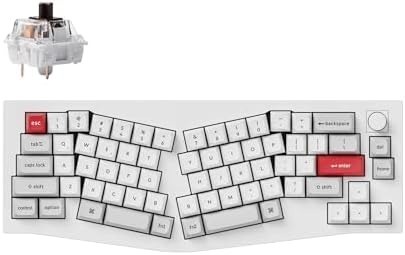
- Wireless Connectivity & Multi-Device Support: Keychron Q8 Pro features Bluetooth wireless and USB Type-C wired connectiv…
- Ergonomic Alice Layout & Multi-System Compatibility: 65% Alice split layout designed for ergonomic comfort to reduce wri…
- Full Metal Body & Double-Gasket Design: Constructed with 6063 aluminum via full CNC machining and 24 processes for durab…
The Keychron Q8 features an ergonomic “Alice layout” designed for improved typing comfort.
Key Features
- Mechanical switches
- Aluminum build quality
- Customizable layout
Pros
- Premium mechanical typing experience
- Highly customizable
- Durable design
Cons
- Wired only
- Slightly expensive
Best for: Developers who prefer mechanical keyboards.
Perixx PERIBOARD-512

- Split-Key Ergonomic Design: One-piece split layout separates keys into left and right zones to reduce wrist bending and …
- Long Key Travel & Tactile Feedback: Extended key travel delivers responsive, tactile feedback with audible confirmation,…
- Old-School Curved Row Design: Stepped, curved key rows promote a natural typing posture and reduce fatigue during long s…
The Perixx PERIBOARD-512 is an affordable ergonomic keyboard with a split design.
Key Features
- Split keyboard layout
- Adjustable tilt
- Wired connectivity
Pros
- Affordable ergonomic keyboard
- Comfortable typing
- Good for beginners
Cons
- Basic design
- Limited features
Best for: Budget-friendly ergonomic setups.
Why Programmers Need an Ergonomic Keyboard
Many developers experience wrist pain or discomfort after long coding sessions. Using the best ergonomic keyboard for programmers can help prevent these problems.
Benefits include:
- Reduced wrist strain
- Better typing posture
- Improved comfort during long work sessions
- Lower risk of repetitive strain injuries
For programmers who type thousands of lines of code daily, an ergonomic keyboard can make a big difference.
How to Choose the Best Ergonomic Keyboard for Programmers
Choosing the best ergonomic keyboard for programmers depends on several factors.
1. Keyboard Layout
Ergonomic keyboards often use split or curved layouts.
Common layouts include:
- Split keyboard
- Curved keyboard
- Alice layout
These designs help align your hands naturally.
2. Mechanical vs Membrane
Mechanical keyboards offer:
- tactile feedback
- durability
- customizable switches
Membrane keyboards offer:
- quieter typing
- lower cost
- lighter design
Programmers often prefer mechanical keyboards for better typing feedback.
3. Wrist Support
Good ergonomic keyboards include:
- built-in wrist rests
- soft palm support
- adjustable tilt angles
These features help maintain proper hand positioning.
4. Connectivity Options
Ergonomic keyboards may offer:
- wired connection
- Bluetooth
- USB receiver
Wireless keyboards reduce desk clutter, while wired keyboards provide consistent performance.
5. Customization
Some ergonomic keyboards allow you to customize:
- key layouts
- shortcuts
- macros
This can be very helpful for programming workflows.
Tips for Creating a Comfortable Programming Workspace
The best ergonomic keyboard for programmers works best when combined with a comfortable workspace.
Consider adding:
- adjustable desk
- ergonomic chair
- monitor stand
- wrist rest
A good workstation setup helps reduce fatigue and improves productivity.
Frequently Asked Questions
What is the best ergonomic keyboard for programmers?
The Kinesis Advantage2 and Logitech Ergo K860 are two of the best ergonomic keyboards for programmers due to their comfort and design.
Are ergonomic keyboards worth it for programmers?
Yes. Ergonomic keyboards help reduce wrist strain and improve typing posture during long coding sessions.
Do ergonomic keyboards improve typing speed?
Many users experience improved typing speed after adapting to an ergonomic keyboard because of better hand positioning.
Are mechanical ergonomic keyboards better for coding?
Mechanical ergonomic keyboards provide tactile feedback and durability, making them ideal for developers who type frequently.
Conclusion
Choosing the best ergonomic keyboard for programmers can significantly improve comfort, productivity, and typing efficiency. Programmers who spend long hours coding should consider an ergonomic keyboard to reduce wrist strain and maintain proper typing posture.
Options like the Kinesis Advantage2, Logitech Ergo K860, and Keychron Q8 offer excellent ergonomic designs that support long coding sessions.
By selecting the right ergonomic keyboard and creating a comfortable workspace, you can enjoy a healthier and more productive programming experience.